
OEE
What is the difference between RS Production and Good Solutions' web platform?
The difference in short: From measuring to improving. From OEE systems to tools for continuous production improvements. RS Production is a proven platform used by thousands of users in hundreds of factories. Good Solutions' web platform is a Manufacturing Improvement Platform (MIP). It is a broader tool for the factory's daily management and improvement work, with a powerful OEE system as part of the whole.
Text by Robin Ottenfelt · CMO
Fact-checked by Mikael Persson · Co-founder and CEO ·
Published · Last updated
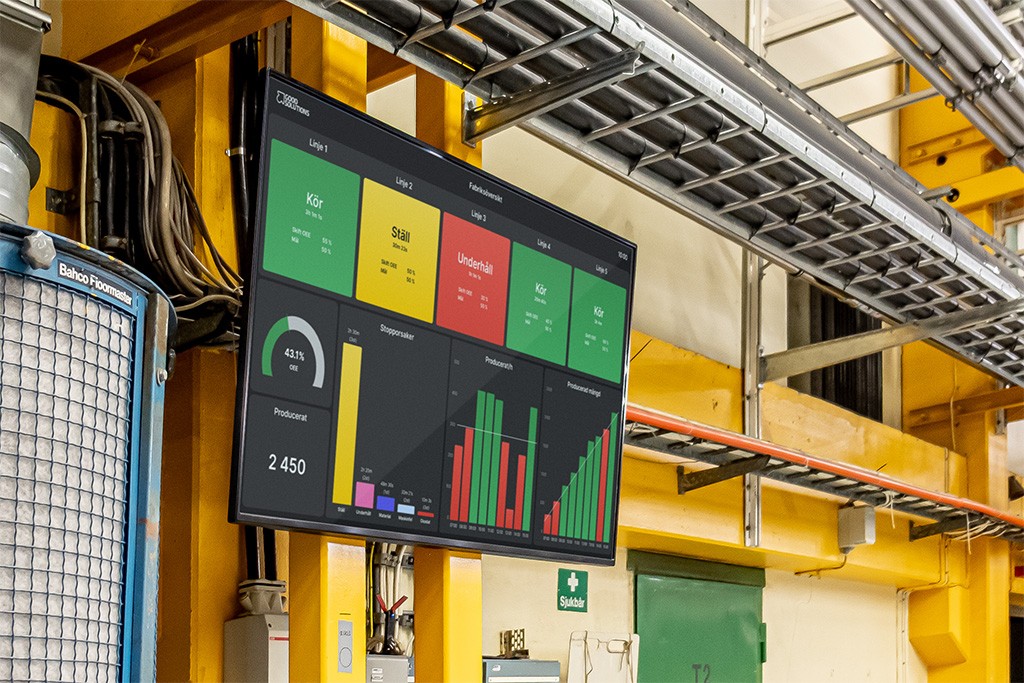
Good Solutions' web platform is a Manufacturing Improvement Platform (MIP). It is a broader tool for the factory's daily management and improvement work, with a powerful OEE system as part of the whole.
The web platform supports the entire chain, from automatic data collection of OEE and losses to digital boards for daily management and assigned actions. It also features tools for root cause analysis, improvement projects, and following up on standardised work, allowing improvements to be implemented and shared across the organisation.
For plant managers and production managers, the difference lies in moving from merely measuring losses to resolving them sustainably.
Good Solutions helps team members in various roles work in a structured, data-driven way with continuous improvement. You can track results in both productivity and financial metrics.
What is RS Production?
RS Production is a proven platform used by thousands of users across hundreds of factories. It has been developed continuously since 2005. The server runs in the cloud, while operators and production management work in installed clients on Windows computers.
In RS Production, you monitor production, log downtime reasons, and analyse losses. Information is displayed in real time on screens across the plant floor, used in pulse meetings, and available within the system's reporting and analytics tools.
The tools are structured by task:
Operator tools are used at the machine on a Windows computer, typically with a touchscreen. The operator starts and stops runs, codes downtime, registers scrap and rework, and completes checklists and inspections that appear automatically at the right time. The operator can also call for assistance using Andon and track progress against daily production targets. Operator tools engage operators directly and provide a clear overview of actual output versus target. The tool can also report completed quantities and times back to the ERP system.
Office tools are used for reports, analytics, and system configuration on a Windows PC with a keyboard and mouse.
Info Screens display live production status on screens throughout the factory floor. Users build custom screen views without writing any code. Views are assembled using visual components that display the exact information you need on the shop floor, at pulse meetings, and during management reviews.
RS Production Mobile displays OEE, downtime, order status, scrap, and cycle times in a mobile app.
RS Production consists of several products and add-ons: OEE, ACT for forms and documents, Energy for energy monitoring, and Screens for real-time displays and meetings. Andon is used for internal communication and functions as an integration API for ERP connectivity. SSO and multi-site support are also available as add-ons.
What is the Good Solutions web platform?
The Good Solutions web platform is a Manufacturing Improvement Platform (MIP). It is built from the ground up for continuous production improvement, rather than simply being an OEE system with software add-ons. The platform supports the entire process—from detecting losses and understanding root causes to taking action and tracking results. The tools are tailored to the roles and working practices of manufacturing companies.
From machine data to tracked improvement
- Capture baseline data
Machine events and operator registrations.
- Understand losses
Analyse root causes, scale, and recurring patterns.
- Take action
Assign prioritised issues to clear ownership and shop floor execution.
- Track and standardise
Verify results and establish proven working methods.
Automated measurement data. Machine connectivity via OPC UA, MQTT, or an RS-IoT gateway provides real-time data on production, OEE, energy consumption, and losses.
Daily management. Digital meeting boards and action lists help teams and leadership across all levels stay informed and allocate time and resources where they deliver the greatest impact.
Analysis and improvement projects. Dedicated tools for root cause analysis and improvement projects show the financial value, produced volume, and uptime that an improvement can deliver. They guide technicians and continuous improvement leaders through the PDCA cycle—from analysis through to execution, follow-up, and organisation-wide adoption.
Standardised work. Operator support ensures teams follow agreed standard operating procedures. This includes quality checks, autonomous maintenance, changeover instructions, 5S audits, or root cause problem solving. Version-controlled forms deliver full traceability. Real-time messages and push notifications alert engineering, quality, logistics, and management to operator needs instantly.
The Good Solutions Manufacturing Improvement Platform is modular. Each manufacturer can start where the return on investment is highest.
Users log in directly via a web browser on a PC, tablet, or mobile device. The web client requires no local installations or software updates.
Operators receive tasks and work instructions directly on the machine display. Production supervisors monitor the shift and identify deviations in real time. Operations management maintains a clear overview of risks before production targets are missed.
Continuous improvement leaders gain the data and tools needed to justify, implement, and track improvements. As a plant manager, you can evaluate losses and performance trends over time to inform capital investment and operational decisions. The platform also provides an objective, data-backed foundation for rolling capacity planning over the coming months.
Platform modules
Digital meeting boards and action lists
Digital forms, inspections, and documents
OEE system for production tracking and loss analysis
Features and integrations
Machine connectivity via IoT gateway, OPC UA, or MQTT
Operator tools with production scheduling, order reporting, downtime coding, work instructions, forms, and checklists in a unified workflow
Andon and team messaging
Dashboards for real-time plant views and digital meeting boards
Production timeline displaying OEE, downtime, durations, and output quantities in a single view
Reporting and analytics tools to break down OEE and losses
AI tools to identify trends, detect patterns, and recommend corrective actions
Deviation management and action tracking
What-if analysis to evaluate financial impact
Energy monitoring
Automated data export to BI tools and third-party systems
Integrations with ERP and CMMS / maintenance software
Enterprise information security features, including SSO and MFA
What are the key differences?
The difference goes beyond simply moving OEE tracking to a web browser. The web platform connects data collection and loss analysis directly to daily continuous improvement work: standard work instructions, quality inspections, autonomous maintenance, and rapid escalation during line stoppages. OEE identifies where production capacity is lost; the broader platform tools empower you to execute countermeasures and verify the resulting improvements.
Area | RS Production | Good Solutions web platform (MIP) |
|---|---|---|
System access | Locally installed Windows clients (Operator tools and Office tools) and RS Production Mobile | Web browser; zero client installations required |
Devices | Windows PCs, preferably touchscreens at the line. Dedicated mobile app for monitoring production | PC, tablet, smartphone, and displays—all accessible via standard web browsers |
Hosting | Cloud service | Cloud service |
Operator view | Downtime coding, scrap registration, digital forms, documents, Andon, production schedule, and shift log | Downtime coding, scrap registration, digital forms, documents, Andon, production schedule, and shift log |
Analytics and reporting | Office tools on Windows PC | Reports, timeline, and dashboards accessible directly in the web browser |
AI capabilities | Not supported | Automated trend and pattern detection with recommendations for focus areas and actions |
Stoppage alerts | Andon add-on | Andon and team messaging with manual and automated notifications across mobile devices and operator interfaces |
Machine connectivity | RS IoT, BlackBox, and Edge Service | IoT gateway, OPC UA, MQTT, and Edge Service |
Architecture | Suite of standalone products and add-ons | Manufacturing Improvement Platform designed for continuous improvement, featuring an integrated OEE core |
Open integration API | None | REST API for orders, parts/articles, and documents |
Information security | SSO and MFA available as options | Native, built-in SSO and MFA |
Streamlined continuous improvement. The web platform consolidates source data, analytics, and action tracking into a unified solution. This lowers the barrier to launching and scaling productivity initiatives.
Zero-install deployment. RS Production requires installing and maintaining client software on Windows machines. The web platform requires only a modern web browser and login credentials. You can deploy tablets directly on production lines or visualise dashboards on shop-floor smart TVs.
Effortless insight sharing. Dashboards and reports within the web platform can be shared instantly via URLs with other authorised users. Recipients simply open the link in their browser. This direct web-based sharing is not supported in RS Production.
What remains the same across both systems?
Both platforms feature automated OEE tracking and comprehensive loss analysis. Machine data is gathered automatically, while operators supply critical context by coding downtime reasons.
OEE is calculated using the standard formula: Availability × Performance × Quality. While machine signals pinpoint exactly when a line stops, they cannot always detect why. Operator input remains vital to distinguish whether downtime was caused by mechanical failure, material shortages, upstream starvation, or staffing bottlenecks.
Both systems run securely in the cloud, eliminating the need for local on-premise application servers. Simple edge hardware or an Edge Service handles machine-level communication.
Regardless of platform, operational success requires defining clear ownership: who reviews losses, what corrective measures are taken, and how results are verified. Use this shared dataset to drive shift handovers, daily stand-ups, and continuous improvement meetings.
What does the web platform mean for operations leaders?
You can run daily management meetings and lead continuous improvement initiatives from any smartphone or tablet, whether on the plant floor or off site.
Losses, potential savings, and realised gains can be visualised directly in output volume and financial metrics. This makes assessing business value much clearer than reviewing raw machine hours or OEE percentages alone.
You also gain the data necessary to detect operational trends and identify changes affecting capacity, utilisation, and manufacturing costs.
With tracking and continuous improvement consolidated into a single platform, cross-functional teams spend less time extracting data across disconnected tools. Bringing maintenance, quality, and production scheduling into decision-making becomes seamless.
Simplified information access. Maintenance engineers, quality managers, production planners, and plant directors log in through their web browser. There is no need for IT to install client software on individual workstations.
Reduced local IT administration. No desktop client software to deploy, configure, or patch. Machine connectivity is straightforward: a compact IoT gateway requires only 230 V power, configures via smartphone, and transmits securely over cellular networks. For direct machine connections and local systems via OPC UA or MQTT, a local Edge Service is deployed.
Continuous feature releases. Good Solutions continuously improves and expands the web platform. Upgrading ensures immediate access to continuous software enhancements across your selected modules.
Upgrading to the web platform is straightforward
Migrating from RS Production to the Good Solutions web platform is straightforward. All your historical RS Production data is migrated seamlessly, preserving production history so you can track performance without disruption. Good Solutions supports your team throughout migration and initial onboarding.
An opportunity to streamline daily operations
Reports. Which reports drive your current production and management meetings? Identify opportunities to simplify, consolidate, or replace static reports with real-time digital dashboards.
Data capture. Are operators manually logging data that could be automated or that provides little operational value? Migrating is an ideal opportunity to eliminate unnecessary data entry.
Downtime reasons. Can operators quickly select the right reason codes? Review your downtime structure to merge redundant codes and eliminate ambiguous catch-alls under ‘Other’.
You do not need to overhaul your working procedures to migrate. However, if you wish to simplify and optimise routines, the migration provides a structured opportunity to do so alongside Good Solutions.
How does Good Solutions support your migration?
Your dedicated Customer Success Manager and Good Solutions delivery consultants will manage the transition, transfer all existing data, and onboard your team. They can also help you optimise reporting, standardise data collection, and refine downtime reason trees during the upgrade.
At SCA’s sawmill in Bollsta, Production Manager Joakim Norlander mounted the line tablets, opened the web application, and operators began working in the system immediately. “That is true user-friendliness!” he observed.
Good Solutions provides Swedish support and has been ISO 27001 certified since April 2026.
Learn more about the Good Solutions platform
Frequently asked questions
Are RS Production and the web platform the same system?
No. RS Production is a mature, field-proven platform used by thousands of manufacturing professionals across hundreds of sites, built on locally installed Windows desktop clients. The Good Solutions web platform is an advanced Manufacturing Improvement Platform (MIP) with OEE at its core. It operates entirely within modern web browsers to support daily management and continuous shop floor improvement.
Can we choose not to migrate from RS Production to Good Solutions?
No. The Good Solutions web platform represents the natural evolution of RS Production. Over the coming period, every customer using RS Production will be supported in migrating to Good Solutions, with functionality matched to their existing RS Production configuration.
When should we schedule our upgrade from RS Production?
Coordinate with your Customer Success Manager to select a date that fits your production schedule. The migration process is smooth, and all historical data carries over. You do not have to redesign existing reports or workflows beforehand, although you may use the transition to streamline operations if you wish.
Will our historical data be preserved during the upgrade?
Yes. All production data and complete history from RS Production migrate directly into the web platform. Good Solutions manages the data transfer process end to end.
Does the web platform work on tablets and smartphones?
Yes. You can access the platform via any standard browser on shop-floor tablets, office PCs, and mobile phones. Live dashboards can be displayed on meeting screens, and alerts from Andon and team chat can be routed directly to mobile devices.
Does IT need to install local software to run the web platform?
Users access the system directly via web browsers with no desktop clients required. Machine data collection may require edge equipment: the IoT gateway plugs into standard 230 V power and communicates via cellular networks. For local protocols like OPC UA or MQTT, a local Edge Service is utilised.
How long does an upgrade take?
Your Customer Success Manager will provide a tailored timeline based on your specific plant configuration. Good Solutions guides you through every stage, including complete data migration from RS Production.
Read more
What is loss analysis and how do you use it in production?
Loss analysis involves breaking down production losses by cause, line, article, shift, and time, so that the factory knows exactly where capacity and money are being lost. The analysis is what makes an OEE figure useful: the figure shows that losses exist, while the analysis shows where, when, and why. It is the loss analysis that allows improvement efforts to be targeted at the most costly losses first, rather than those that are simply the most visible.
What is daily management and how does it work in production?
Daily management is a structured way of working where the production team meets daily, often for a short stand-up meeting, to review yesterday's results, today's plan, and any deviations that need to be addressed. The purpose is to detect and resolve problems within hours instead of weeks. With an OEE system as a source of truth, the meeting is based on actual numbers rather than recollections, and deviations become visible the same day they occur.
How do you select the right OEE system?
Start with the outcome you want to achieve, not with a feature list. Ensure the system is easy to use, supports daily management, provides reliable data, delivers deep loss analysis and real-time visibility, matches your machine fleet, integrates with other systems, and is scalable.
Take the first step towards increased productivity
Book a demo, and our experts will present a concrete plan to increase productivity, reduce resource use, and achieve profitability and sustainability targets.
Or call us and we will help you
© 2026 Good Solutions Sweden AB